
Grants, contracts, and restricted funds. One platform that keeps you on track.
Starting from spreadsheets and inboxes? Baylani organizes it for you. Already on Cayuse or Workday? It works alongside them, no rip-and-replace.
We're working with a small group of early partners: nonprofits, smaller colleges, community health organizations, and small grants teams.
Actual product walkthrough · demo workspace with sample data
Most organizations manage multiple grants and contracts spread across spreadsheets, inboxes, shared drives, accounting systems, and people's memories.
Accounting systems show where the money went. Baylani shows what the funding is for, what it requires, and what needs to happen next.
- Human-reviewed AIEvery output is advisory. A person decides.
- Requirements cited to sourceEach one quotes the solicitation.
- Internal reviews with an audit trailFindings, decisions, and reviewers recorded.
- Works alongside your systemsNo migration. Your records stay where they are.
One record, every function
Baylani connects them so everyone works from the same picture.
A grant or contract is a set of promises — what the money is for, what the funder requires, and when each report is due. Baylani helps the people who manage the money, the work, and the rules read the same promises, drawn from the systems they already use.
Finance knows the balance.
Restricted and unrestricted balances by fund and award, budget vs. actual, and what is left to spend — each tied to the grant or contract that funds it.
Programs know the purpose.
What each award is for, the work it funds, the deliverables it expects, and the tasks that need to happen next — with the documents alongside.
Compliance knows the rules.
Requirements, restrictions, allowable costs, approvals, reporting obligations, and deadlines — cited to the award and tracked to completion.
For teams without a system
From spreadsheets to on track, without the scramble.
Stop tracking grants in your head, your inbox, and five spreadsheets. Baylani keeps every requirement, deadline, and task in one place.
No grants office? No grants system? You don't need one to start. Bring the solicitation, the award letter, and the spreadsheet you use today. Baylani turns them into a clear list of what each grant requires, who owns it, and when it's due.
How it works
Know what every dollar requires and what's due next.
Requirements, cited
Baylani reads the solicitation or award and builds a requirement checklist, each item linked to its source page. You review and accept it.
Internal reviews with an audit trail
Run an internal review against the accepted requirements. Every finding, decision, and reviewer is recorded in an audit trail.
Ask Baylani
Ask what's due, what's missing, or what an award allows, and have Baylani create the task. Tasks it creates are labeled “via Ask Baylani,” so you always know where work came from.
Your team, your roles
Invite colleagues with workspace roles so finance, programs, and compliance each see what they need.
Find funding
Find the funding, then keep track of it.
Search federal grants on Grants.gov, federal contract opportunities on SAM.gov, and District of Columbia contract solicitations on DC PASS from one search bar. Save what fits and start the application in Baylani. You decide what to pursue.
- Grants.gov
- SAM.gov
- DC PASS
Recommended for your organization
Recommendations come from your organization's profile, and each one shows the profile detail it matched. Dismiss the ones that don't fit.
Saved, with follow-ups
Save opportunities and funders, set a dated follow-up, and flag anything you still need to check.
Every application, at a glance
- Drafting
- Internal Review
- Submission Ready
- Submitted
Baylani shows where each application stands. A person on your team still submits it, in Grants.gov or wherever the funder asks.
Other capabilities are in development with our early partners.
Ask Baylani
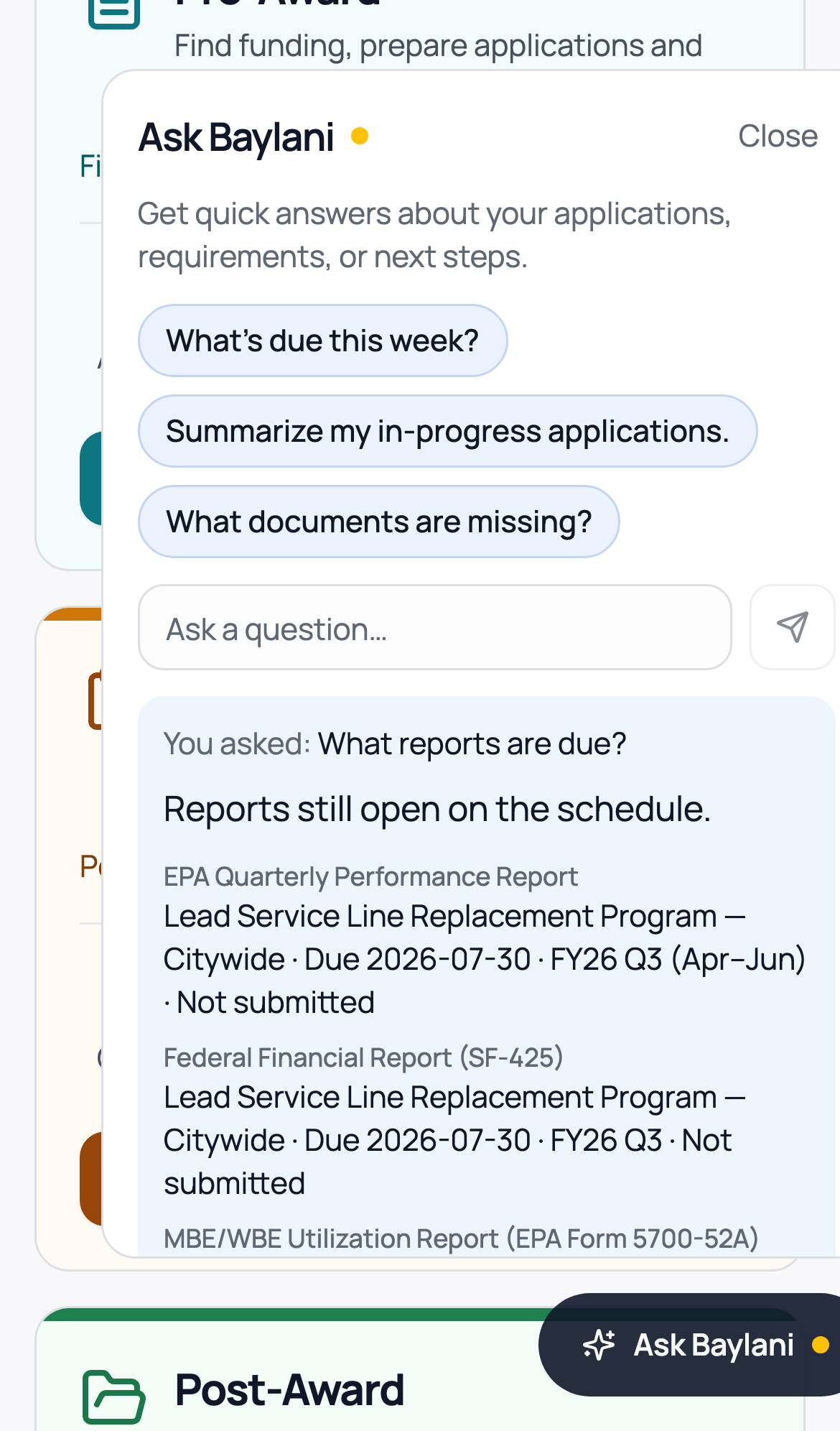
- “What needs my attention?”
- “What reports are due?”
- “What needs prior approval on this award?”
- “How much is left on this award?”(when your ledger is connected; this reflects your books, not the sponsor's award balance)
Ask Baylani can turn an answer into a task, assigned and logged “via Ask Baylani.” Every AI answer is advisory. Your team decides.
When the records cannot answer, Baylani says so instead of filling the gap.
Structured records underneath
Answers come from your awards, requirements, deadlines, and transactions — not from a chat history.
Evidence attached
Each requirement quotes its source, and each balance drills to the transactions behind it.
No guessing
When a record is unavailable or outside your permissions, Baylani says so instead of filling the gap.
Submissions stay with your team.
Baylani prepares the package and checks it against the requirements. A person on your team submits it in Grants.gov or the sponsor portal. Baylani never logs into portals or submits on your behalf.
Who it's for
- Nonprofits
- Smaller colleges & universities
- Community health organizations
- Small grants teams
- Grant consultants
- Government contractors
- Foundations & sponsored programs
Works with the systems you already have
Your systems hold the records. Baylani helps move the work.
Larger organizations don't need to replace anything. Your accounting system stays the book of record, and your eRA system stays where it is. Baylani sits alongside them and works from your documents and exports today.
Accounting: QuickBooks Online and Xero
Connected read-only. Your ledger stays the source of truth.
eRA and ERP: Cayuse, InfoEd, Workday
Planned
Google Drive and OneDrive
Planned. Direct upload works today.
Not another system of record, and no forklift migration. QuickBooks Online and Xero connect read-only. More connections are on the way, each with an honest status. See integration status
The funding is complicated. Staying on top of it shouldn't be.
We're inviting a small number of organizations to shape Baylani with us.
About Baylani
Baylani is built by BridgeTrust Partners LLC, Washington, DC. Questions? hello@baylani.com